FortiBleed Is Another Reminder That VPN Exposure Is the Problem
FortiBleed is not just another headline. It is another warning. Stop using VPNs.
In June 2026, researchers reported a large-scale credential compromise campaign dubbed FortiBleed, involving tens of thousands of Fortinet FortiGate firewalls and VPN gateways. Reports describe exposed or verified credentials for more than 73,000 Fortinet systems, with some researchers estimating a major share of internet-facing FortiGate devices may have been affected. Fortinet has said the campaign appears to rely on credentials from previous incidents rather than a newly disclosed vulnerability, but for security teams the distinction offers little comfort: exposed VPN and firewall access remains a high-value path into the enterprise.
FortiBleed lands after a long sequence of Fortinet firewall, VPN, FortiOS, FortiProxy, FortiClient EMS, and FortiWeb vulnerabilities. Recent examples include CVE-2024-55591, an authentication bypass in FortiOS and FortiProxy that Fortinet said was exploited in the wild, and CVE-2025-24472, another authentication bypass affecting FortiOS and FortiProxy. CISA also added Fortinet vulnerabilities such as CVE-2025-59718 to its Known Exploited Vulnerabilities catalog, underscoring that this is not a theoretical risk.
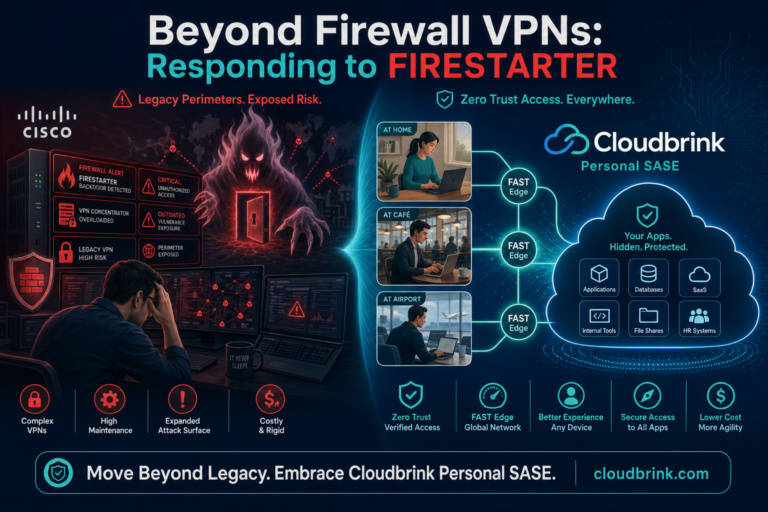
The pattern: VPNs and internet-facing firewalls keep becoming the front door
Fortinet is far from the only VPN vendor facing security issues, but FortiBleed highlights a bigger architectural problem: traditional VPN and firewall remote access models often require internet-facing services, persistent access paths, exposed login portals, and credentials that attackers can probe, steal, replay, or crack.
That puts IT and security teams in a reactive loop:
Patch the latest CVE. Rotate credentials. Audit logs. Disable exposed interfaces. Check for rogue accounts. Communicate with users. Repeat.
The operational cost is enormous, and the risk window is often unacceptable. In many cases, by the time a CVE is disclosed, exploitation has already started.
Cloudbrink locks down Fortinet VPN access immediately
Cloudbrink™ helps organizations reduce Fortinet VPN exposure without forcing a disruptive rip-and-replace on day one.
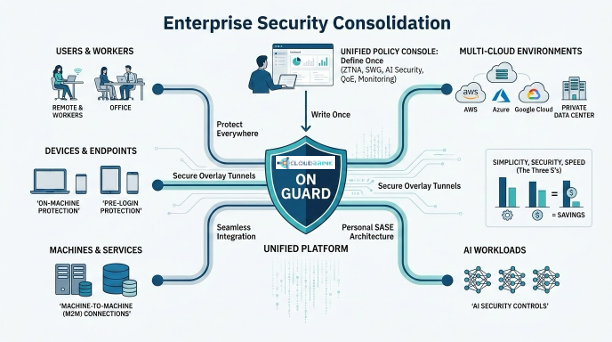
For customers using IPSec-based legacy VPN infrastructure, Cloudbrink can use its IPSec Adapter approach to restrict VPN exposure so the VPN accepts connections only through the Cloudbrink-controlled access path. This limits IPSec exposure to Cloudbrink rather than leaving the VPN broadly reachable, reducing attack surface while customers transition toward a fully TLS 1.3-based ZTNA architecture.
In practical terms, Cloudbrink gives teams a two-step path:
Step 1: Lock down what you already have.
Cloudbrink can sit in front of the existing Fortinet VPN access path and sharply reduce who and what can reach it. Users authenticate through the Brink App first, and access is governed by identity, device posture, and policy before traffic is allowed onward. This reduces exposed VPN attack surface while the organization continues patching, rotating credentials, and investigating risk.
Step 2: Transition users to Cloudbrink Personal SASE.
Once the immediate exposure is contained, users can be migrated to Cloudbrink’s high-performance ZTNA with personal SD-WAN, FAST Edges, Brink Protocol optimization, Internet Security, and multi-cloud connectivity. Cloudbrink’s architecture uses mutual TLS 1.3, frequent certificate rotation, Dark-Cloud secure access to private applications, and unified policy management across users, applications, and environments.

Why the migration is not just about security
Security gets the urgency, but user experience wins the migration.
A national insurance company moved from Fortinet FortiClient and Cisco AnyConnect to Cloudbrink after struggling with performance bottlenecks, scalability issues, security limitations, and high support overhead. Its remote employees had slow, unstable connections because VPN traffic was hairpinned through data centers. With Cloudbrink, the organization transitioned 300 employees on day one and more than 600 by the end of the first week, while remote connectivity support tickets “pretty much disappeared.”
That is the Cloudbrink advantage: Simplicity, Security, and Speed in one service.
Cloudbrink vs. Fortinet VPN for secure remote access
| Category | Fortinet firewall / VPN access | Cloudbrink Personal SASE advantage |
|---|---|---|
| Internet exposure | VPN and firewall access paths are often internet-facing, creating a target for credential attacks, brute force, exploitation, and CVE-driven compromise. | Cloudbrink removes exposure with zero-trust access controls and can lock down IPSec VPN access through Cloudbrink-controlled connectivity before full migration. |
| Security model | Traditional VPN access can place authenticated users onto broad network paths, increasing lateral movement risk if credentials are compromised. | High-performance ZTNA enforces least-privilege access based on user, device posture, application, and policy. |
| Encryption and certificates | Legacy access stacks may depend on older tunnel architectures and longer-lived trust assumptions. | Cloudbrink uses mutual TLS 1.3 and frequent certificate rotation as part of its zero-trust architecture. |
| User experience | VPN traffic often hairpins through data centers, adding latency and instability for remote workers. | FAST Edges and the Brink Protocol deliver LAN-like application performance by optimizing traffic close to the user. |
| Deployment | Firewall and VPN changes can require hardware, gateway planning, bandwidth sizing, and complex change windows. | Cloudbrink is 100% software-only, with lightweight Brink App deployment and cloud-delivered management. |
| Migration approach | Risk often remains until the VPN is patched, reconfigured, or replaced. | Cloudbrink can first lock down the Fortinet VPN exposure, then migrate users and applications over time. |
| Policy and visibility | VPN, firewall, SWG, SD-WAN, and ZTNA functions may be managed across separate tools. | Cloudbrink provides unified policy and visibility across SaaS, private apps, hybrid cloud, and users. |
| Cost model | Costs can grow through appliances, gateways, bandwidth, add-ons, and operational support. | Cloudbrink uses simple named-user licensing with no separate licenses for FAST Edges, connectors, bandwidth, or features. |
| Business outcome | Security teams stay in a reactive patch-and-respond cycle, while users often complain about poor performance. | Cloudbrink improves security posture, simplifies operations, and gives users fast, reliable access from anywhere. |
The takeaway: patch Fortinet, but do not stop there
Organizations using Fortinet firewalls and VPNs should follow vendor guidance, rotate credentials, enforce MFA, audit for compromise, and apply current patches. But FortiBleed shows why patching alone is not enough. There is likely another breach around the corner.
The real question is not, “How fast can we patch the next Fortinet CVE?”
The better question is, “Why is our VPN still exposed to the internet in the first place?”
Cloudbrink gives IT and security teams an immediate way to reduce Fortinet VPN exposure and a practical path to modern secure access. Start by locking down the existing VPN. Then move users to a faster, simpler, more secure Personal SASE architecture built for the hybrid workforce.
Cloudbrink delivers the 3 S’s: Simplicity, Security, and Speed—so organizations can reduce risk, cut support overhead, and give users the in-office experience anywhere.