Personal AI assistants, also known as digital copilots, are proliferating at a frenetic pace with 33% CAGR and market opportunity of $10+bn in 2026[1]. There are generic personal assistants such as OpenClaw and functional specific AI assistants (digital copilots) such as VIDUR AI for chartered accounting. These AI assistants help in improving efficiency and productivity of the user, but they are also becoming a critical attack vector that is making the infosec and IT teams nervous.
Challenges for Infosec and IT Administrators
- The infosec and IT administrators are looking for ways to detect the usage of these AI assistants and desperately need controls to manage their usage by the users.
- A more important factor is to manage the access to other corporate applications and data if AI assistants are detected on the endpoints.
Enterprises need a way to use AI safely, and something that is easy to use and effective against all AI agents and AI online services.
Cloudbrink Safe AI
Cloudbrink is a high-performance Personal SASE platform that includes Safe AI module to safeguard AI adaption by enterprise users. As part of the Safe AI module, Cloudbrink provides
- deep visibility into the AI usage by the users,
- ability to detect and mitigate any AI agents or assistants that enterprise wants to explicitly block,
- ability to control access to AI Agents to enterprise data,
- detect and block or redact sensitive data, and
- secure high-performance access to shared GPU infrastructure.
Cloudbrink Safe AI for Personal Assistants (AI)
Cloudbrink provides two methods to detect an AI personal assistant being used by the users.
The best thing about Cloudbrink posture assessment feature is that these checks are not limited only for “login-time” event, these checks are run periodically at intervals configured by the admin. This ensures that even if user started the AI personal assistant after login, it is detected very quickly and enforcement action is taken.
- Device posture assessment check for any processes
- Custom-script evaluation check for any data elements on the endpoint
1) Device posture assessment check
Cloudbrink supports ability to check the endpoint posture status and enforce the access controls as per the status. As part of the posture status check, Cloudbrink can check for the presence or absence of any process.
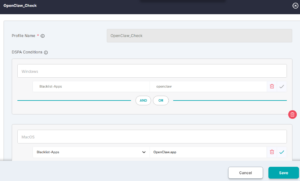
Use case: If customers want to limit the access to corporate apps and data if the user is running OpenClaw personal assistant, admin can configure a device posture assessment check for OpenClaw. If the OpenClaw process is running, user can access only limited set of corporate apps. The full-set and limited-set of apps are configured by the admin to limit exposure to OpenClaw.
Device-posture check for OpenClaw
2) Custom-script evaluation check
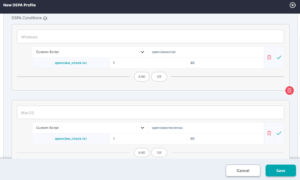
Cloudbrink supports programmable way of verifying the endpoint posture status, which gives a lot more flexibility to customers to customize which data elements on the endpoint needs to be checked for determining endpoint health status.
Admin Portal configuration to use above script
BAT script for windows to check for OpenClaw
| @echo off
setlocal enabledelayedexpansion
set FOUND_RUNNING=0
REM —————————————— REM 1. Process Name Check (tasklist) REM —————————————— for %%P in (openclaw.exe openclaw-ai.exe claw.exe) do ( tasklist /FI “IMAGENAME eq %%P” 2>NUL | find /I “%%P” >NUL if !ERRORLEVEL! == 0 ( set FOUND_RUNNING=1 ) )
REM —————————————— REM 2. WMIC Process Check (partial match) REM —————————————— wmic process where “name like ‘%%claw%%'” get name 2>NUL | find /I “claw” >NUL if %ERRORLEVEL% == 0 ( set FOUND_RUNNING=1 )
REM —————————————— REM 3. Windows Service Check REM —————————————— for %%S in (OpenClaw OpenClawAI ClawService) do ( sc query %%S 2>NUL | find “RUNNING” >NUL if !ERRORLEVEL! == 0 ( set FOUND_RUNNING=1 ) )
REM —————————————— REM 4. Port Check (common local AI ports) REM —————————————— for %%P in (3000 5000 8000 11434) do ( netstat -ano | findstr :%%P | find “LISTENING” >NUL if !ERRORLEVEL! == 0 ( set FOUND_RUNNING=1 ) )
REM —————————————— REM Final Output REM —————————————— if %FOUND_RUNNING% == 1 ( echo 1 ) else ( echo 0 )
endlocal |
Shell script for Mac OS
| #!/bin/bash
APP_NAME=”openclaw” APP_DISPLAY_NAME=”OpenClaw” IS_INSTALLED=0 IS_RUNNING=0 # —————————– # 1. Process-based detection # —————————– if pgrep -i “$APP_NAME” >/dev/null 2>&1 || pgrep -i “$APP_DISPLAY_NAME” >/dev/null 2>&1; then IS_RUNNING=1 fi # —————————– # 2. Application bundle check # —————————– if [ -d “/Applications/${APP_DISPLAY_NAME}.app” ] || \ [ -d “$HOME/Applications/${APP_DISPLAY_NAME}.app” ]; then IS_INSTALLED=1 fi # —————————– # 3. Binary existence check # —————————– if command -v openclaw >/dev/null 2>&1; then IS_INSTALLED=1 fi # —————————– # 4. File system search (limited scope for performance) # —————————– if [ $IS_INSTALLED -eq 0 ]; then FOUND_PATH=$(mdfind “kMDItemDisplayName == ‘*OpenClaw*'” | head -n 1) if [ -n “$FOUND_PATH” ]; then IS_INSTALLED=1 fi fi # —————————– # 5. Launch services / plist check # —————————– if ls ~/Library/LaunchAgents 2>/dev/null | grep -i “openclaw” >/dev/null || \ ls /Library/LaunchAgents 2>/dev/null | grep -i “openclaw” >/dev/null || \ ls /Library/LaunchDaemons 2>/dev/null | grep -i “openclaw” >/dev/null; then IS_INSTALLED=1 fi # —————————– # 6. Port-based detection (common AI/local servers) # —————————– COMMON_PORTS=(3000 5000 8000 8080 11434)
for PORT in “${COMMON_PORTS[@]}”; do if lsof -iTCP:$PORT -sTCP:LISTEN -n -P 2>/dev/null | grep -i “openclaw” >/dev/null; then IS_RUNNING=1 fi done
# —————————– # 7. Activity Monitor (ps fallback) # —————————– if ps aux | grep -i “openclaw” | grep -v grep >/dev/null; then IS_RUNNING=1 fi
# —————————– # Final decision # —————————– if [ $IS_INSTALLED -eq 1 ] && [ $IS_RUNNING -eq 1 ]; then echo 1 else echo 0 fi |
Summary
As enterprises and administrators explore options to manage the AI adaption by the users in their organization, Cloudbrink is bringing in a suite of tools to address the exact same problem. The Cloudbrink Safe AI module provides customers with the right set of capabilities that help in bringing the below aspects for AI.
- AI Visibility
- AI Detection and Enforcement
- AI ZTNA
- AI Sensitive Data Protection
- Custom/Private AI Safety
- Shared GPU infrastructure security
The power of AI should not be limited by the concerns of AI security, and Cloudbrink can prove to be the right platform to alleviate the AI security concerns and make AI adaption Safe and Simple.
[1] Personal AI Assistant Market Growth Analysis – Size and Forecast 2025-2029 | Technavio | Technavio